
Position vs Timeseries vs Trace
Understanding vessel endpoints
Searoutes provides several endpoints to access vessel tracking data derived from AIS signals. While these endpoints all relate to vessel movement, they serve different purposes depending on the level of detail and processing required.
This guide explains the differences between Position(vessel/v2/position), Timeseries(/vessel/v2/timeseries), and Trace(/vessel/v2/trace), and when each endpoint should be used.
Overview
| Endpoint | What it returns | Typical use cases |
|---|---|---|
| Position | Latest known position of a vessel at a given date. | Real-time tracking |
| Timeseries | Historical AIS position signals | Movement analysis, raw AIS inspection |
| Trace | Cleaned and reconstructed vessel trajectory | Map visualization, voyage reconstruction |
Position
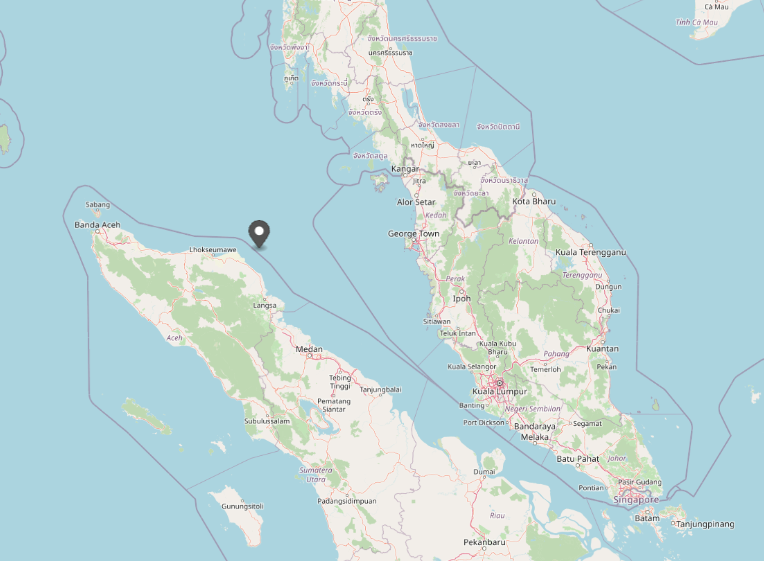
The Position endpoint returns the latest known AIS position of a vessel at a given moment.
By default, it provides the most recent position reported by the vessel’s AIS transponder. However, when a specific timestamp is provided, the endpoint returns the latest available AIS position at that time.
Each position includes navigation attributes such as timestamp, geographic position (longitude and latitude), speed, course and heading, draft, etc.
This endpoint is useful when the goal is to know where a vessel is or was at a specific moment.
Typical use casesinclude:
- displaying the current location of vessels on a map
- retrieving the vessel position at a given historical timestamp
- updating operational dashboards or monitoring tools
Because it only returns a single position, this endpoint is lightweight and well suited for real-time applications or frequent queries.
Example: /vessel/v2/position?imo=9839179&dateTime=2024-10-01T00%3A00%3A00Z
Timeseries
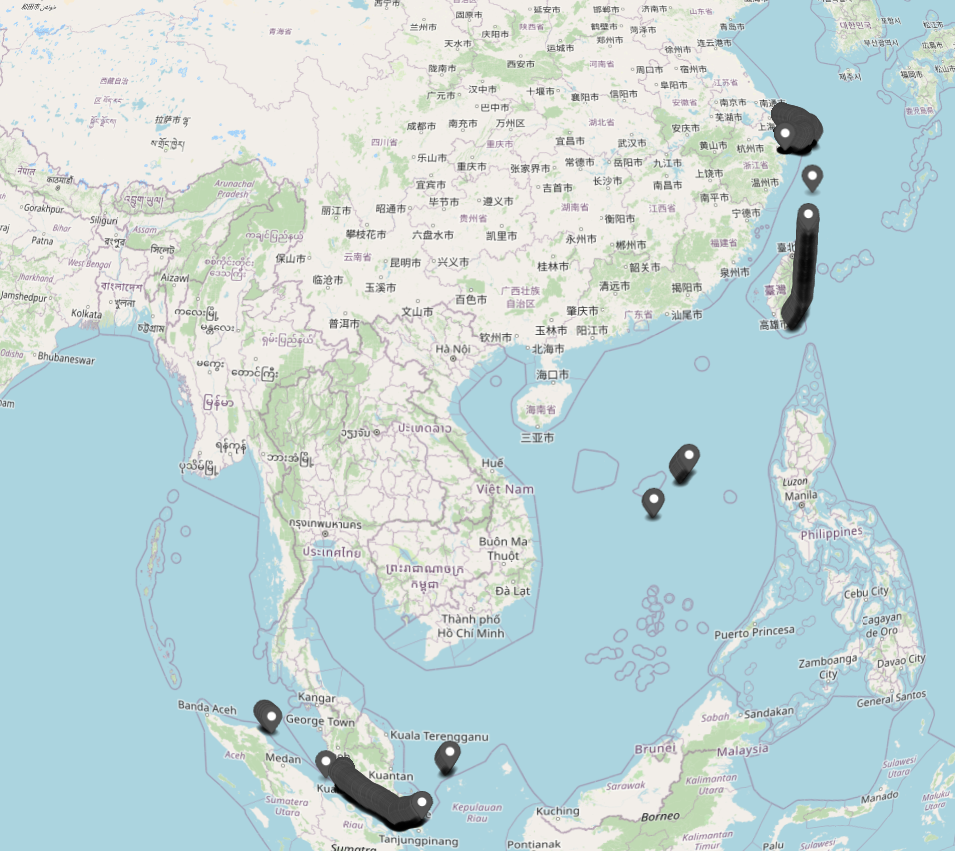
The Timeseries endpoint returns historical AIS positions for a vessel within a specified time range.
Each entry corresponds to a position report transmitted by the vessel’s AIS system and typically includes timestamp, geographic position (longitude and latitude), speed, course and heading, draft, etc.
Timeseries data represents the raw sequence of AIS transmissions, allowing users to inspect the vessel’s reported movement over time.
Typical use cases include:
- analyzing vessel movement patterns
- studying AIS signal behavior
- performing custom trajectory analysis
- building analytics or research datasets
Because AIS transmissions may contain noise, gaps, or inconsistencies, the timeseries data may sometimes appear irregular when visualized directly.
Example: /vessel/v2/timeseries?imo=9839179&departureDateTime=2024-10-01T00:00:00Z&arrivalDateTime=2024-10-15T00:00:00Z
Trace
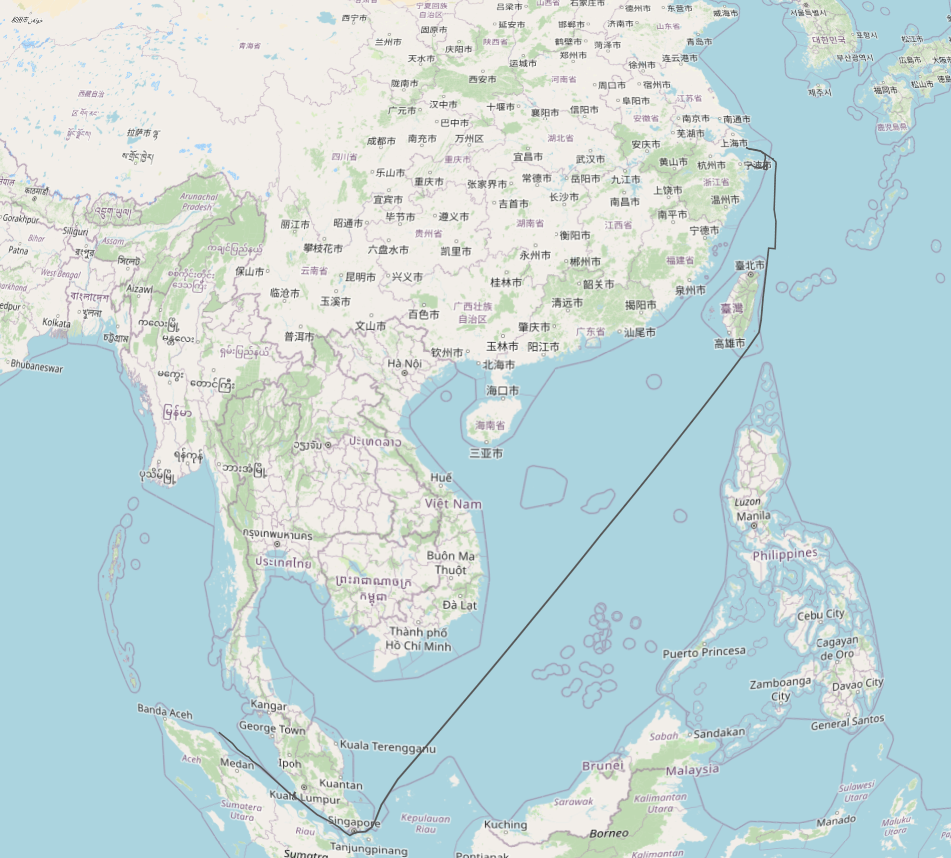
The Trace endpoint returns a cleaned and reconstructed vessel trajectory derived from AIS signals.
Instead of exposing every AIS transmission, the trace is built by processing the underlying AIS positions to remove inconsistencies and reconstruct a realistic vessel path.
This cleaning process helps remove common AIS noise such as:
- unrealistic jumps caused by transmission errors
- clusters of overlapping signals near ports
- small oscillations while the vessel is stationary
The resulting trajectory provides a clearer representation of the vessel’s movement, making it well suited for visualization and route reconstruction.
Typical use cases include:
- displaying vessel routes on a map
- reconstructing historical voyages
- estimating traveled paths
- analyzing shipping routes
For a detailed explanation of how traces are reconstructed and cleaned, see the Trace reconstruction and cleaning guide.
Example: /vessel/v2/trace?imo=9839179&departureDateTime=2024-10-01T00:00:00Z&arrivalDateTime=2024-10-15T00:00:00Z
Choosing the right endpoint
The choice between Position, Timeseries, and Trace depends on the type of information needed. Use:
- Position when you only need the vessel’s latest location at a given time.
- Timeseries when you want all historical AIS signals and need full transparency on the underlying data.
- Trace when you need a clean and interpretable trajectory suitable for visualization or route analysis.
Summary
The three endpoints provide complementary views of vessel movement:
- Position → latest known AIS location at a given time
- Timeseries → historical AIS signals
- Trace → cleaned vessel trajectory
Together, they allow developers to access vessel tracking data at different levels of detail depending on their application needs.
Updated 7 months ago